
Доброго времени суток!
Пытаюсь наладить знакомство с дисплеем и выходит не очень. Начал с запуска примеров и сразу начал спотыкаться о проблемы.
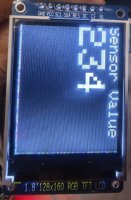
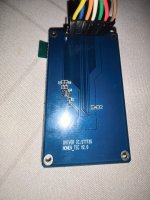
Вопрос №1 (по теме): имеется TFT LCD дисплей разрешением 128х160 точек. При подключении и испытании на примерах из вкладки "TFT" есть строки заполненные пикселями разного цвета. Дисплейчик целый, т.к. на разных примерах вертикальные строки меняют сторону дисплея с левого на правый и наоборот. Горизонтальные строки всегда находятся внизу и при смене примеров не менялись. Содержимое будто смещено относительно поля дисплея.
Прошу помочь разобраться, в чем может быть проблема и как ее решить
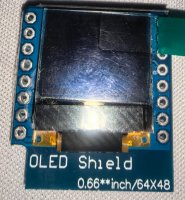
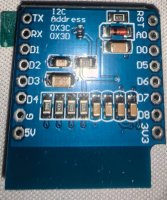
Вопрос №2 (дабы не создавать отдельную тему): также имеется OLED дисплей с разрешением 64х48 точек. Подскажите, как его можно подключить физически и програмно? Ничего похожего не нашел в интернете
Пытаюсь наладить знакомство с дисплеем и выходит не очень. Начал с запуска примеров и сразу начал спотыкаться о проблемы.
Вопрос №1 (по теме): имеется TFT LCD дисплей разрешением 128х160 точек. При подключении и испытании на примерах из вкладки "TFT" есть строки заполненные пикселями разного цвета. Дисплейчик целый, т.к. на разных примерах вертикальные строки меняют сторону дисплея с левого на правый и наоборот. Горизонтальные строки всегда находятся внизу и при смене примеров не менялись. Содержимое будто смещено относительно поля дисплея.
Прошу помочь разобраться, в чем может быть проблема и как ее решить
C++:
/*
  Arduino TFT text example

  This example demonstrates how to draw text on the
  TFT with an Arduino. The Arduino reads the value
  of an analog sensor attached to pin A0, and writes
  the value to the LCD screen, updating every
  quarter second.

  This example code is in the public domain

  Created 15 April 2013 by Scott Fitzgerald

  http://www.arduino.cc/en/Tutorial/TFTDisplayText

 */

#include <TFT.h>  // Arduino LCD library
#include <SPI.h>

// pin definition for the Uno
#define cs   10
#define dc   9
#define rst  8

// pin definition for the Leonardo
// #define cs   7
// #define dc   0
// #define rst  1

// create an instance of the library
TFT TFTscreen = TFT(cs, dc, rst);

// char array to print to the screen
char sensorPrintout[4];

void setup() {

  // Put this line at the beginning of every sketch that uses the GLCD:
  TFTscreen.begin();

  // clear the screen with a black background
  TFTscreen.background(0, 0, 0);

  // write the static text to the screen
  // set the font color to white
  TFTscreen.stroke(255, 255, 255);
  // set the font size
  TFTscreen.setTextSize(2);
  // write the text to the top left corner of the screen
  TFTscreen.text("Sensor Value :\n ", 0, 0);
  // ste the font size very large for the loop
  TFTscreen.setTextSize(5);
}

void loop() {

  // Read the value of the sensor on A0
  String sensorVal = String(analogRead(A0));

  // convert the reading to a char array
  sensorVal.toCharArray(sensorPrintout, 4);

  // set the font color
  TFTscreen.stroke(255, 255, 255);
  // print the sensor value
  TFTscreen.text(sensorPrintout, 0, 20);
  // wait for a moment
  delay(250);
  // erase the text you just wrote
  TFTscreen.stroke(0, 0, 0);
  TFTscreen.text(sensorPrintout, 0, 20);
}
Вопрос №2 (дабы не создавать отдельную тему): также имеется OLED дисплей с разрешением 64х48 точек. Подскажите, как его можно подключить физически и програмно? Ничего похожего не нашел в интернете